
How it works
Every order in seven steps, and who does each one
A prescriber approves before anything is prescribed, and your clinic chooses when patients pay. Signing the prescription is its own step, and no medicine reaches the pharmacy before it.
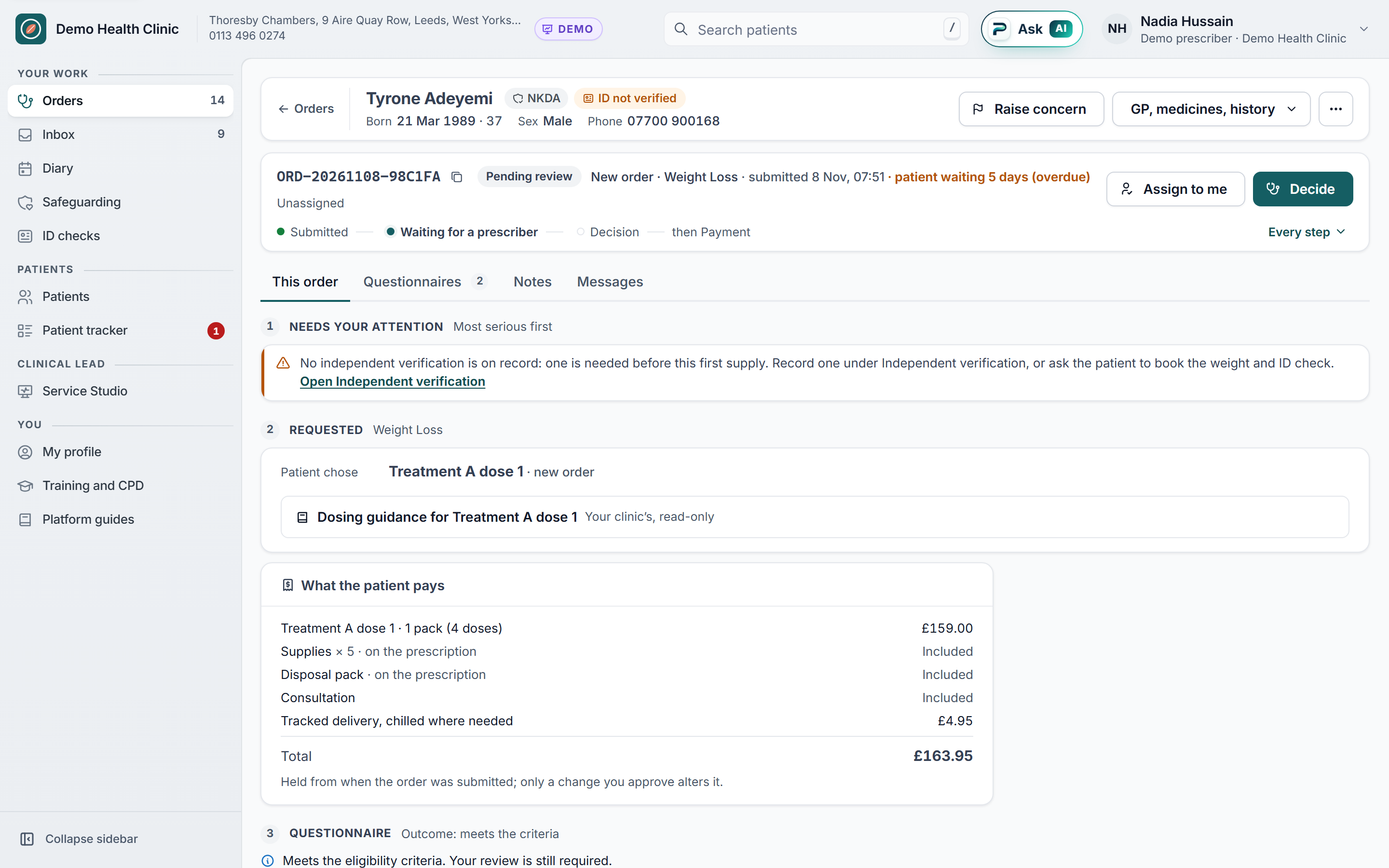
- Where the order isEach step so far and what comes next, with the whole journey a click away.
- What is missingAn unverified ID or unrecorded allergies, before anyone decides.
- DecideApprove, ask for information, ask to book, hold or reject.
Video guide
Take the 4-minute tour

One order
Follow one order through the seven steps
Choose a step to see what it looks like and what goes on the record.
ORD-20261020-7KQ2
Your Clinic, weight management, new patient
Pharmacy, patient and GP
Dispatched, tracked and on the record
Tracking on the order, the patient kept up to date and, with their consent, a GP letter written for your team to send. A repeat supply follows the same steps after a check-in.
- Dispensed and packed
- Dispatched with tracking
- Patient told, in your clinic’s name
- GP letter written, with consent
On the record7 of 7
- 09:41Answers stored, questionnaire version 4
- 11:20Verified by video, weight and height
- 11:34Approved, with a note and a reason
- 11:52Paid into your Stripe account
- 12:15Prescription signed, tamper-evident PDF
- 12:16Sent to the pharmacy, once
- 15:40Dispatched with tracking, GP letter written
Complete: every step is in the order’s evidence pack.
End-to-end journey
From the first answer to the patient’s door
Seven steps, in the order the product enforces them. A repeat supply follows the same steps after a check-in.
- Payment when the clinic choosesAfter approval by default, or at submission with an automatic refund if declined.
- Signing is its own stepA prescription is signed separately, by a prescriber with a verified registration.
- Sent once, after signingNo medicine reaches the pharmacy before the prescription is signed; then the clinic’s setting or its staff send it.
- Verified before a first supplyWhere a service requires it, the prescriber verifies the patient independently first, such as by a video weight and ID check.
- Patient
Questionnaire
On your clinic’s own portal, in your brand. Patients start without an account and create one to send their answers. Your eligibility rules flag answers for the prescriber, and a hard stop can never be approved.
- Patient & prescriber
Verification
Where the service requires it, the prescriber verifies what the patient said before a first supply: by a video weight and ID check the patient books in your portal, in person, from clinical records, with the GP or from a previous provider.
- Prescriber
Decision
Your prescriber takes the order from their queue, flagged answers first, and approves, asks for more information or declines, with a note and a reason. Once recorded, a decision can’t be edited.
- Patient
Payment
By default the patient pays after clinical approval. A clinic can take payment at submission instead, refunded in full if the request is declined. Either way, the money goes into your own Stripe account, and nothing is prescribed before approval and payment.
- Prescriber
Prescription
The prescriber signs the prescription for the approved, paid order with their own digital signature, which pharmacies can verify: a step of its own, separate from approval.
- Your team & pharmacy
Pharmacy
Once the prescription is signed and the patient’s identity verified, the order goes to your pharmacy, once: automatically if you switch that on for the service, otherwise when your team sends it.
- Pharmacy
Dispatched
The pharmacy dispenses and dispatches the order, and tracking appears on it. With the patient’s consent, a GP letter is written for your team to send. A repeat supply follows the same steps after a check-in.
Each service chooses how orders reach the pharmacy: automatically once the prescription is signed, or sent by your team, and an order is sent once. The pharmacy then dispenses and dispatches it itself.
Consultations
One consultation, from booking to decision
Video calls open inside the clinic’s portal, with nothing to download, and are never recorded. General appointments can also be held by phone where the clinic allows it; the weight and ID check is always by video.
- Patient
Book
Free times in UK time in the clinic’s portal, with the first available prescriber by default.
- Pathlyn
Confirm and remind
A confirmation, then reminders a day and an hour before. Emails say when and how, never why.
- Patient
Join
Join appears in the portal ten minutes before: a camera check, then a waiting room until the prescriber lets them in.
- Prescriber
Start-of-call checks
Consent, identity and location confirmed; for a weight and ID check, photo ID and the scales seen on camera.
- Prescriber
Complete
The outcome goes on the patient’s record. A missed call is marked as a no-show and the patient is invited to rebook.
- Prescriber
Clinical review
A passed check records the independent verification, so a first supply that needs one can now be approved, prescribed and sent.
Who does what
Six parties, each with one clear responsibility
The same seven steps, read by who does them: useful when a clinic or pharmacy group maps Pathlyn onto the way it already works.
Patient
Answers the questionnaire, pays when the clinic asks (after approval or at submission), and receives their order and check-in reminders.
Your clinic
Owns its clinical policies and checks its prescribers, sets each service’s prices and when patients pay, and decides whether orders go to the pharmacy automatically or when your team sends them.
Prescriber
Runs video or phone consultations, verifies what the patient said where the service needs it, makes the clinical decision and signs the prescription.
Pathlyn
Runs the software: your portal, the diary and video calls, the prescriber’s queue, payments, the clinical record and the audit trail behind every step.
Stripe
Takes payment when your service asks for it, into your clinic’s own connected Stripe account.
Pharmacy
A pharmacy in the Pathlyn pharmacy network, or your own: it dispenses and sends the order once it is sent to it, and its progress comes back onto the order.
Getting set up
From your public record to your first order
Before the first patient, your clinic is set up in four steps. Nobody types your details in from scratch, and nobody is handed a password.
- Pathlyn
Your organisation, from its record
Set up from your public record: Companies House, the CQC register or the NHS pharmacy list, so names and registered details start out right.
- Your team
Your team, by invitation
Each person joins from a single-use invitation emailed to them and chooses their own password. Nobody is ever given one.
- Your team
A second factor
Every member of staff sets up a second factor when they first sign in, and uses it every time after.
- Your admin
Your agreement, signed online
Your organisation admin reads and signs the agreement online; it is one of your go-live checks.
Questions
What clinics ask about running on Pathlyn
See this journey running on your own service
Book a demo and we will walk through the questionnaire, the video check, the decision, payment, prescribing and the pharmacy together.